

- Home
- Services
We bring to you New-Age Digital Solutions
- Automated Translation
- TECHVED AI
- Case studies
- CLIENTS
- More

Let's get started
We believe in advancing your business growth with innovative ideations and strategies
Get In Touch


 Back
BackRemote Online Usability Testing : Why , How , and When to Use It
RemoteOnlineUT

Jay Anthony
14 March 2014 | 8 min read
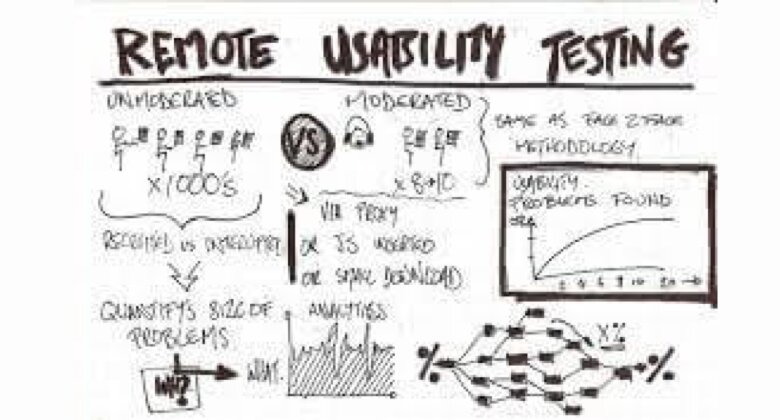
By Dabney Gough and Holly Phillips on 2003/06/09. “If you’re considering using this technique, it’s a good idea to consider the pros and cons before diving in. Despite this method’s similarity to in-person usability testing, there are significant differences as well.”
After completing a remote usability testing study, the manager of research and usability at Agilent Technologies, and myself, a usability consultant at Socratic Technologies, decided to write a synopsis of our experiences conducting remote online usability testing for several areas of Agilent’s website. We feel that sharing pros and cons, as well as tips for success, will be useful for other usability practitioners who are unfamiliar or inexperienced in this particular technique. Remote online testing versus traditional usability testing
Traditional, one-on-one usability testing in person is a great technique for uncovering usability issues on your website. It provides your team, as well as management, the opportunity to watch actual users use and give feedback about your site. This “reality check” is invaluable for stakeholders, designers, and developers. Unfortunately, though, in-person usability testing isn’t always feasible. Projects take longer than expected, budgets get tightened, and target users can be hard to come by. So what’s a usability crusader to do when in-person usability testing is impossible? One option is to conduct usability interviews using an online meeting service, such as WebEx. (There are a number of other companies offering similar services, but our discussion will focus on WebEx since that is the service used for this particular study.) WebEx is a web-based service that allows users in remote locations to participate in online meetings. WebEx offers many features, including the ability to share viewing and control of a web browser. Using this feature during a telephone interview allows the moderator to view the user’s mouse movements and web pages visited. Control of the browser is easily passed back and forth between moderator and respondent, and therefore, facilitates discussion similar to that of a traditional in-person usability interview. If you’re considering using this technique, it’s a good idea to consider the pros and cons before diving in. Despite this method’s similarity to in-person usability testing, there are significant differences as well.
Benefits to remote online interviews
The “remote” aspect of this technique is certainly appealing; it makes it easier to reach respondents in diverse geographic areas, and you don’t need to limit your users to a single city or area (unless you want to). This is particularly useful if you are developing for a small, hard-to-reach, or decentralized group of users for whom it would be difficult to schedule interviews at a single location otherwise. Another benefit is the potential cost savings, particularly if you typically travel and/or rent a focus group facility for your testing. It eliminates travel costs for the interviewer and team, which is useful when your team is scattered across the country, as was the case for our project. Instead of paying for travel costs and facility fees, you pay a per-minute, per-participant fee to use WebEx. The interview schedule can be much more flexible, eliminates the need to “make the most” of a day’s rental at a focus group facility, and allows your users to select a time that suits their individual schedules. Since most respondents choose to participate from their office or home, there’s also a slightly more ethnographic element to remote testing. However, keep in mind that, as with any ethnographic study, respondents may become distracted by people or things in their environment during the course of the interview. (One interviewee participated from the comfort of his kitchen—the clang of pots and pans were audible in the background.) These distractions could be considered a benefit or a limitation of the technique, depending on what type of feedback you’re looking for. One final benefit of this type of testing involves exposure at the client’s company. Typically, the research manager and direct team are the only ones that can feasibly attend in-person usability interviews—a handful of very interested people, but still just a portion of the folks who could benefit from first-hand observation. Remote online interviews suddenly enable these other interested people, from senior management to the actual website developers, to “attend.”
Limitations and drawbacks
There are a number of limitations to using a meeting service to conduct usability testing: the most obvious being that you aren’t in the physical presence of the respondent. Consequently, there is an additional “degree of separation” that can be challenging. You cannot see the respondent’s facial expressions and other nonverbal cues, and it’s more difficult to build rapport and trust when you’re just a voice on the other end of the phone. Another potential drawback of using a meeting service is cost. WebEx offers a monthly, unlimited-use subscription plan, but because of our limited needs, we elected to use the pay-per-use plan. In the latter scenario, charges are per minute, per “attendee.” At last check, a single hour-long interview with six attendees (including the moderator and user) could run up to $300. Teleconferencing service is not included in the basic pay-per-use cost, and is an additional expense if you don’t already have access to such a service. (WebEx does offer teleconferencing, also charged on a per-user, per-minute basis.) Using an online meeting service could end up being more expensive than renting a focus group facility, depending on how many interviews you plan to conduct, the anticipated number of “observers,” and any travel costs you might normally incur. (Note, though, that some clients already have unlimited-use corporate WebEx accounts that could be used for this purpose.) Online remote usability also requires a bit more finagling if you want to record the interviews. A traditional portable usability lab can be used, but this requires you to conduct the interview via speakerphone in order to capture both the moderator’s and the respondent’s comments. Keep in mind, however, that using a speakerphone feature also picks up a great deal of background noise and reduces the sound quality for everyone else on the call. There are a few other recording options that can be exercised separately or in tandem. You can make an audio recording with a simple telephone-hookup tape recorder or through WebEx’s internet phone feature. (A word of caution about using the latter: Setup and use of this feature requires additional equipment and technological know-how on the part of the participant.) For video recording, a traditional portable usability lab (without audio) or WebEx’s screen recording feature can be used.
Tips for a successful study
Recruiting
Online remote usability studies can be recruited through any channel you might use for normal usability testing. However, in a WebEx study you never actually meet the respondent in person, making clear communication much more critical when recruiting respondents. It’s important that respondents know what they need to do and what to expect at the appointed interview time.
- Consider the benefits and drawbacks of using an outside recruiting firm. We did use such a firm’s services, which meant we didn’t actually talk to the respondents until the day of the interview. This takes a lot of administrative burden off of the moderator, but it does add an extra “layer” of management. We had to make sure the recruiters understood what they needed to communicate to the respondents, for example. (Sort of like a real-life game of “Telephone”.)
- Be sure to mention the WebEx requirement when you’re recruiting respondents. It doesn’t need to be elaborate—just say that you’ll be using the technology during the interview, and that they will need to have their computer and Internet connection up and running at the scheduled interview time.
- When recruiting, make sure respondents will be using a high-speed Internet connection during the interview. Ask this question specifically, as a one person did the interview from their home dial-up, which slowed WebEx to the point that we only got to do half the tasks.
Meeting setup
If you’re doing this type of project for the first time, this is the part that takes the most “figuring out.” Careful foresight will take you far in this endeavor…
- Communicate details of each meeting yourself, rather than via WebEx’s system. When you set up the meeting, you have the option to add attendees to the invite list, which sends an automatic reminder email to the participant containing a link to the meeting itself. We recommend against using this feature because the email is sent from WebEx (not you), and breaks the consistency of your communicating directly with the respondent. Additionally, you cannot modify the text within the automatically generated email to reflect details particular to a given interview. (For example, the email lists the meeting time in a single time zone, which is potentially confusing if the email is sent to multiple participants/observers in different time zones.) Instead, copy the meeting ID that is generated in the setup confirmation, email it to the clients, and simply read it off to the respondent when you help them log in to the meeting.
- When setting up each meeting’s options, disable the View Attendee List and Chat features. (You don’t want the respondent to view the attendee list and be intimidated by all the “lurkers.”)
- Use a conferencing system that can suppress notification of attendees who are joining/leaving (via “Now joining” messages as well as beeps). This allows observers to join or leave the meeting without creating a distracting cacophony of entry/exit tones. Agilent’s internal conferencing system could be set up to suppress the beeps, but we could not find a way to do this on the WebEx conferencing system.
- Communicate beforehand that internal attendees must mute their phones throughout the entire interview. There’s nothing more unsettling than the sound of “phantom” keyboards, conversations in the background, or heavy breathing as you’re trying to conduct an interview!
Conducting the interview
Once you have respondents scheduled and the meetings arranged, you’ll be ready to conduct the interviews. There are a number of techniques that will make the interviews themselves go a lot smoother. Most of the following suggestions are aimed at reducing last-minute scrambling (on the part of the moderator) and avoiding possible “dead time” as observers wait for respondents to get up and running.
- Be prepared to spend the first 10 to 15 minutes of each interview getting set up, from helping the respondents log in to demonstrating the shared browser feature. (This is important to keep in mind as you consider how many tasks you can fit in an interview.)
- A few minutes before the scheduled interview time, log in to your WebEx account and start the meeting. By opening the meeting a few minutes early, “observers” will have a chance to log in and get settled. You should also turn on the sharing feature and bring up the URL of the site to be evaluated, so that it’s ready to go as soon as the respondent has joined the meeting.
- At the appointed interview time, call the respondent and walk them through joining the meeting. A short setup feature is required for first-time users, which simply installs a necessary plug-in in the user’s browser.
- To help the respondent log in to the meeting read out the meeting ID number and have them enter it in the appropriate field. (This is another argument for not bothering with the WebEx meeting invitation: giving the respondent the ID verbally, as he or she types it in, is a lot easier than waiting for the respondent to sift through an Inbox in search of the email containing the ID.) You know the respondent has successfully logged in when you see his or her name appear in the “Attendees” list in the main WebEx Meeting Manager window.
- Check that the sharing feature is turned on, and enable the respondent with browser sharing “power.”
- If you are using a teleconference service to allow your team to listen in, we suggest following the guidelines above. In addition, once the respondent has successfully logged in to the meeting, each team member should hang up and call in to the conference number. That way:
- You can be sure that the respondent has logged in to the meeting successfully, and
- You will know when the respondent joins the conference number (useful when such announcements are suppressed in the call system).
Now you can proceed with the same type of introduction you might use in a traditional usability test: describe the purpose of the research, ask the respondent to “think out loud,” reassure them that there are no right or wrong answers, etc. At this point, it’s also useful to cover a few other WebEx-related items:
- State that you’re audio recording, (if applicable) and that you have a few colleagues listening in. In many states, it is illegal to record a telephone call without all callers’ knowledge and consent, so be sure this statement is included in your audio recording.
- Remind observers to keep quiet: say, “…and I just want to remind my colleagues to keep their phones on mute throughout the interview.” Say it once, when everyone’s on the phone, and then move on.
- Finally, give a brief description of how WebEx works, and demonstrate how to trade control of the browser back and forth. This doesn’t take long, but it’s critical for the success of the interview. It also allows you to get a sense of the delay time when transferring control of the browser between the user and yourself, which may vary slightly from interview to interview. Once the participant has the hang of it, get started with the tasks.
- Ask the respondents to point with the mouse as they discuss various aspects of a page. This helps avoid confusion about which link, graphic, or text that they are talking about.
After that, proceed with tasks just as you would normally. Throughout the interview, you may need to remind the respondent to point with the mouse, or to click to take control of the mouse.
Conclusion
If all of this sounds like a complicated endeavor, it’s only because there are a lot of small details that need to be taken care of in order to make everything run smoothly. However, it gets easier with each study you conduct.
This method can be used successfully in many situations. The tradeoff between slightly reduced insight and dramatically increased efficiency may be a beneficial one.
We don’t foresee this becoming “the next wave” in usability testing, for the limitations (inability to see respondent’s facial expressions, limited to participants who have high-speed connections, etc.) are not insignificant. However, this technique is very well suited for instances in which traditional in-person usability is not possible, whether for logistical, financial, or political reasons. In many situations, the benefits of getting user feedback, albeit of a somewhat limited type, far outweigh the possibility of getting no feedback at all.
Most Popular
Multilingual UX for Indic Scripts: Where Regional Language Products Quietly Break

Data-Driven Decision-Making: The Overlooked Foundation of Digital Transformation
Accessibility in the Age of AI: Designing Inclusive Intelligent Experiences

Inclusive Mobile Design: Building Accessible Apps for Global Users

Anticipatory UX: Designing User Experiences That Predict Intent

Safe Innovation: Implementing AI Chatbots with Strict Data Privacy Guardrails

DPDP 2025 Readiness: Building Credible Platforms for a Data-First World
Written By
Jay Anthony
Marketing Head
He led efforts to develop a fully integrated marketing communications plan and growing team. He is responsible for successful corporate re-brand and update of all branded assets.

Stay up-to-date with
all new market trends and
happenings
 #MultilingualUX #IndicScripts #RegionalLanguage #DesignSystems #DigitalAccessibility #TECHVED #TECHVEDConsulting
Multilingual UX for Indic Scripts: Where Regional Language Products Quietly Break
#DataDrivenDecisionMaking #DigitalTransformation #EnterpriseAnalytics #BusinessIntelligence #TECHVED #TECHVEDConsulting
Data-Driven Decision-Making: The Overlooked Foundation of Digital Transformation
#Accessibility #DigitalAccessibility #InclusiveDesign #CustomerExperience #DigitalTransformation #EnterpriseAI #TECHVED #TECHVEDConsulting #ExperienceEngineering
Accessibility in the Age of AI: Designing Inclusive Intelligent Experiences
From Ideation To Digital Transformation
We take care of all your needs


